Event Triggers
Event triggers start agent runs when external events occur. You create a trigger, CubePlex gives you a webhook URL and a signing secret, and any service that can send an HMAC-signed HTTP POST can fire it.
CubePlex does not natively accept a third-party provider's signature format (such as GitHub's X-Hub-Signature-256 or a Stripe Stripe-Signature). The inbound request must be signed the way CubePlex expects: an X-Signature header over "{timestamp}." + body, plus an X-Timestamp header (see Webhook URL and signing). In practice the sender is your own backend or a small relay you control that re-signs the payload. A service whose signature format you can't change (raw GitHub, raw Stripe) cannot fire the trigger directly today.
How it works
- You create a trigger in CubePlex and define what should happen when an event arrives.
- CubePlex generates a webhook URL and an HMAC signing secret.
- Your sender signs each request with that secret using CubePlex's scheme and POSTs it to the URL.
- When a request arrives, CubePlex verifies the signature and timestamp, applies your filter conditions, and durably queues an agent run with the event payload as context.
Creating a trigger
Navigate to your workspace, open Triggers from the sidebar, and click New Trigger. Fill in:
| Field | Description |
|---|---|
| Name | A descriptive label (e.g., "GitHub issue triage"). |
| Source type | The kind of webhook. Currently supports Generic webhook (works with any service that sends JSON payloads). |
| Filter conditions | Optional rules to decide which events should fire the agent. See filtering events. |
| Prompt | The message sent to the agent. You can reference the event payload in the prompt. |
| Target conversation | Where the agent run happens. Same options as scheduled tasks: fixed conversation or new conversation per event. |
| Run identity | Which user the agent run executes as. This controls the agent's permissions and tool access. |
After saving, CubePlex displays the webhook URL and the signing secret. Copy both — you will need them when configuring your sender.
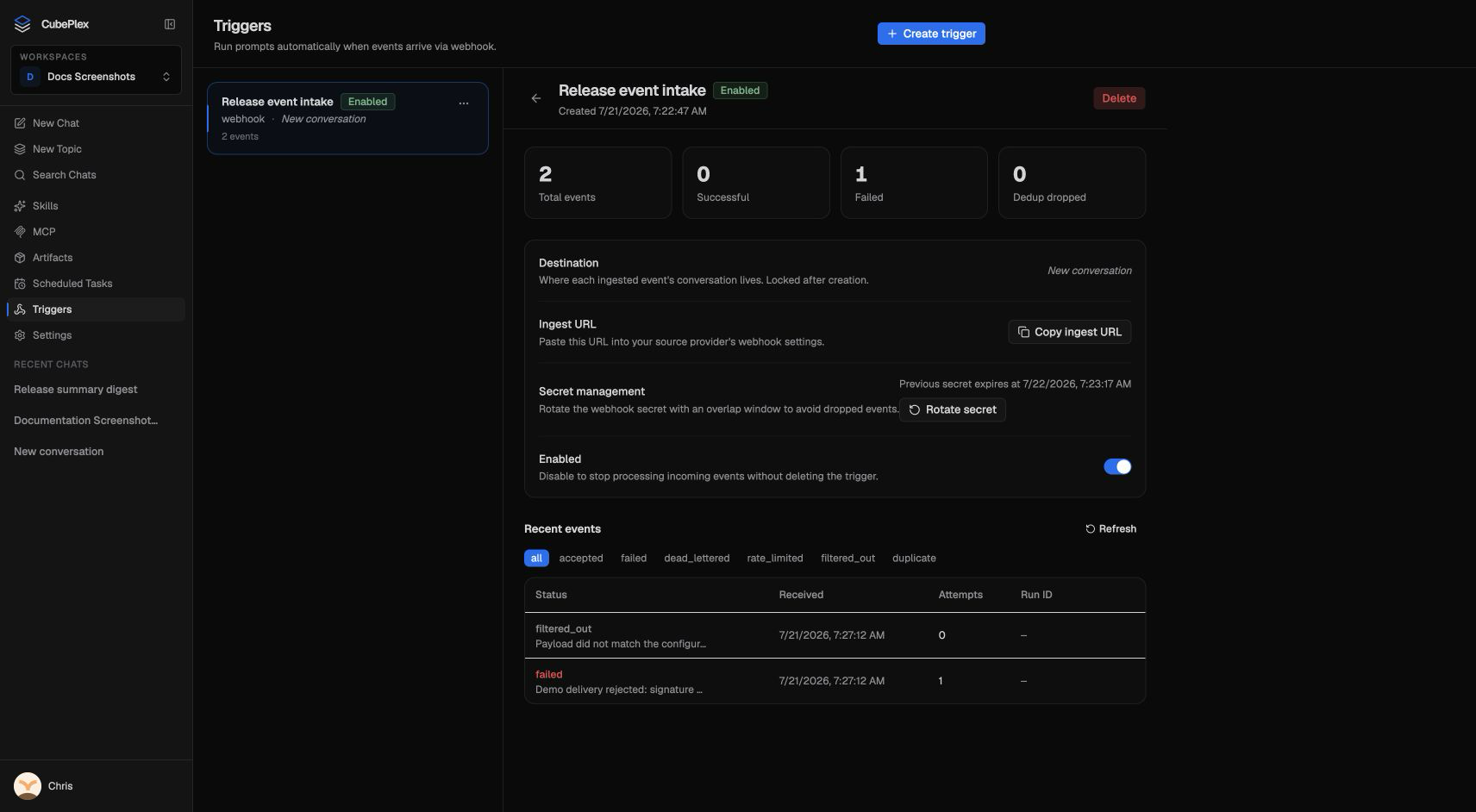
Webhook URL and signing
The webhook URL is workspace- and trigger-scoped:
POST https://<your-cubeplex-host>/api/v1/ws/<workspace_id>/triggers/<trigger_id>/ingest
Copy the exact URL CubePlex shows you — it already contains the right workspace and trigger IDs.
Required headers
Every request must carry these headers (names are the defaults; a trigger's source config can override them):
| Header | Required | Value |
|---|---|---|
X-Signature | Yes | Hex HMAC-SHA256 of the signed message (below), keyed by the signing secret. |
X-Timestamp | Yes | The Unix epoch seconds used in the signature. Must be within 5 minutes of server time, or the request is rejected. |
X-Event-Id | No | A stable per-event ID used for deduplication. If your sender retries, send the same value so CubePlex processes the event once. |
How to sign
The signed message is the timestamp and the raw body joined by a literal dot:
message   = "<timestamp>." + <raw request body bytes>
signature = hex( HMAC_SHA256(signing_secret, message) )
Send signature in X-Signature and the same <timestamp> in X-Timestamp.
What gets rejected
CubePlex returns an opaque 404 {"error":"not_found"} for every rejection — unknown workspace/trigger, missing X-Signature or X-Timestamp, bad signature, a timestamp outside the 5-minute window, or an oversized body (2 MiB cap). The 404 is deliberate: it does not reveal whether the trigger exists. A rejected request never reaches the event log because rejection happens before any event row is created. A successful request returns 202 {"status":"accepted","event_id":"..."} only after the validated event and its execution inputs are durable. A worker can therefore resume the same event after a process restart without creating a second run or conversation.
Filtering events
Not every webhook delivery should trigger an agent run. Filter conditions let you narrow down which events fire, using declarative field matchers on the incoming JSON payload.
Example filters:
| Condition | Effect |
|---|---|
event.action == "opened" | Only fire when a new item is opened (e.g., GitHub issue opened). |
event.repository.full_name == "acme/api" | Only fire for events from a specific repository. |
event.pull_request.draft == false | Ignore draft pull requests. |
You can combine multiple conditions — all conditions must match for the trigger to fire (AND logic).
If no filter conditions are set, every valid webhook delivery fires the trigger.
Rate limiting and deduplication
CubePlex protects against accidental floods and duplicate deliveries:
- Rate limiting — if a trigger exceeds its configured per-minute rate, excess events are recorded as rate limited and dropped. The trigger can return either
429or an acknowledged202, depending on its configuration. - Deduplication — if the same event is delivered multiple times (common with webhook retry mechanisms), CubePlex detects the duplicate and processes it only once.
- Retry with backoff — if the durable handoff fails before a run is accepted, CubePlex retries the same event, conversation, run ID, and execution admission with exponential backoff. Exhausted handoff attempts become dead-lettered; CubePlex does not rerun a model execution that was already accepted.
Event log
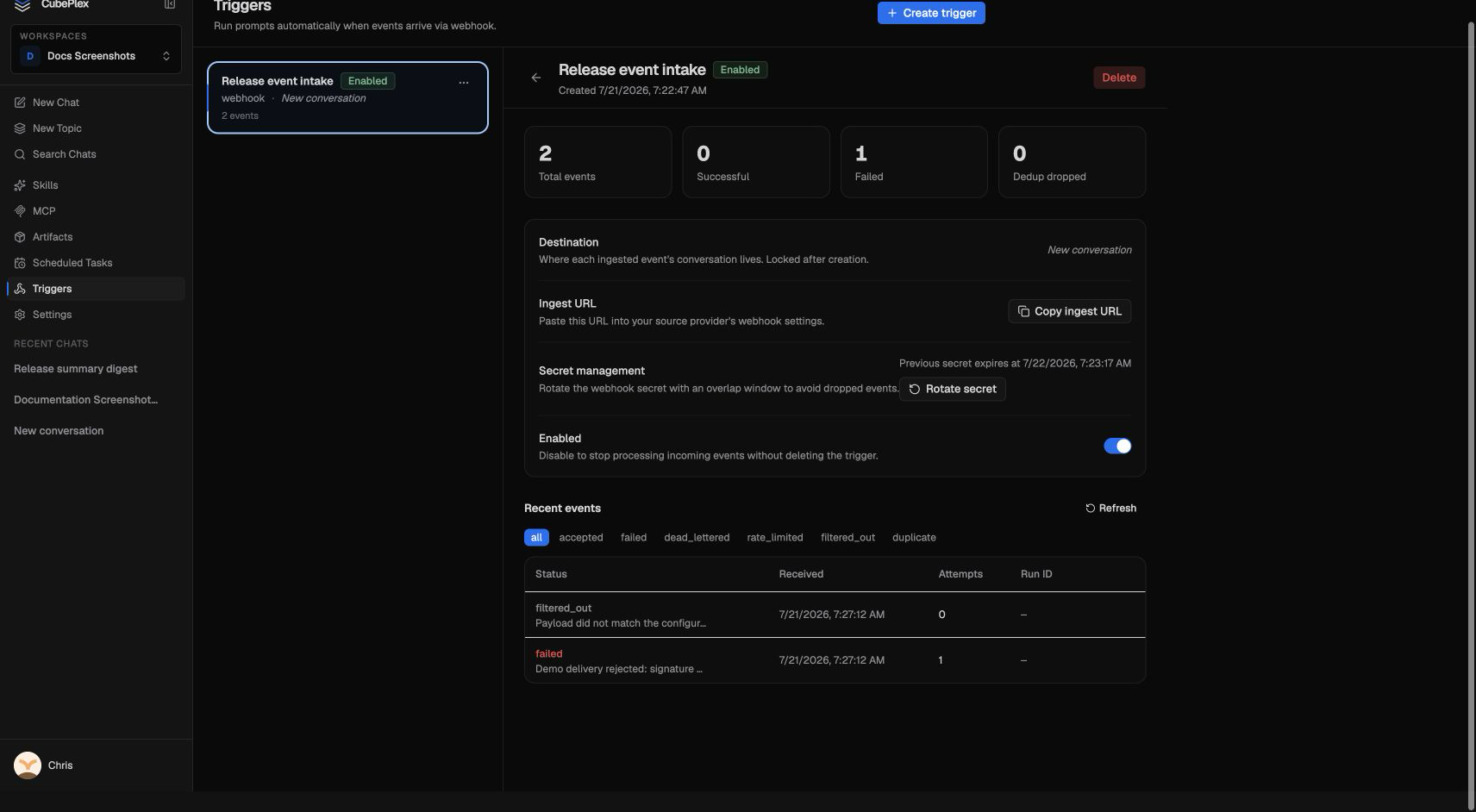
Each trigger has an event log that shows every delivery that passed signature and timestamp verification, along with its outcome:
| Outcome | Meaning |
|---|---|
| Pending / claimed | The event is durably queued or temporarily leased by a worker. A worker crash is recovered after the lease expires. |
| Accepted / processed | The event was handed to the run runtime or its IM queue. |
| Filtered out | Event was received but did not match filter conditions. No agent run started. |
| Duplicate | The event's X-Event-Id (or body hash) was already seen. Processed once; the retry was dropped. |
| Rate limited | The trigger exceeded its per-minute rate; the event was dropped. |
| Cancelled | The trigger was disabled or deleted before the admitted run started. |
| Failed | Validation, authorization, target resolution, or execution admission failed before handoff. |
| Dead lettered | Repeated transient handoff failures exhausted the retry budget. An administrator can replay it as a new revision. |
Requests with a missing/invalid signature or a stale timestamp are rejected with a 404 before any event row is created, so they never appear in the event log. If you expect a delivery and see nothing here, suspect the signature or timestamp — not a filter.
Use the event log to verify that your webhook integration is working, debug filter conditions, and monitor trigger health.
Disabling or deleting a trigger stops new deliveries and cancels events that have not started. Runs already accepted keep running. Deleted triggers disappear from normal lists, while their event and admission records remain available to the recovery path so an interrupted delete cannot revive or duplicate work.
Example: GitHub issue triage
Goal: When a new issue is opened in your repository, the agent automatically triages it — adds labels, assigns a priority, and posts a summary comment.
- Go to Triggers and click New Trigger.
- Name it "GitHub issue triage".
- Source type: Generic webhook.
- Add a filter condition:
event.action == "opened". - Set the prompt:
A new GitHub issue was just opened. Read the issue title and body from the event payload. Based on the content, assign appropriate labels (bug, feature, docs, etc.), estimate priority (P0-P3), and post a triage comment on the issue summarizing your assessment and suggested next steps.
- Choose new conversation per event so each issue gets its own clean context.
- Save and copy the webhook URL and signing secret.
- Stand up a small relay that GitHub can call and that re-signs for CubePlex (GitHub's own signature is not accepted directly — see the caution at the top):
- Point a GitHub webhook (Settings > Webhooks, content type
application/json, events: "Issues") at your relay. - In the relay, verify GitHub's
X-Hub-Signature-256if you wish, then forward the JSON body to the CubePlex webhook URL, signing it with CubePlex's scheme: setX-Timestampto the current epoch seconds andX-Signatureto the HMAC of"<timestamp>." + body.
- Point a GitHub webhook (Settings > Webhooks, content type
- Now when someone opens an issue, GitHub calls your relay, the relay forwards a properly signed request to CubePlex, and the agent triages the issue.
No relay yet? Use the
curlrecipe below to fire the trigger by hand with a sample issue payload and confirm the prompt behaves before wiring up delivery.
Example: Slack alert escalation
Goal: When your monitoring system sends a Slack-formatted webhook for a critical alert, the agent investigates and posts findings.
- Create a trigger named "Critical alert investigation".
- Add a filter condition:
event.severity == "critical". - Set the prompt:
A critical alert was triggered. Investigate the alert details from the event payload, check relevant logs and metrics if tools are available, and provide a preliminary root cause analysis with recommended next steps.
- Choose a fixed conversation so the agent can correlate across multiple alerts.
- Configure your monitoring system (or a relay in front of it) to POST the alert payload to the trigger URL, signed with CubePlex's scheme (
X-Timestamp+X-Signatureover"<timestamp>." + body). Many alerting tools let you set custom headers and a signing secret on outbound webhooks; if yours signs with a fixed scheme you can't change, put a small relay in between.
Tips
- Keep the signing secret secure. Treat it like a password. If compromised, rotate it (or delete the trigger and create a new one).
- Use filters to reduce noise. Broad triggers (no filters) on high-volume webhooks will generate many agent runs and consume model tokens quickly.
- Test with a manual webhook. Before wiring up a live sender, fire the trigger with
curlto verify your prompt and filters. Sign"<timestamp>." + bodyand send both headers — note the signed body must be byte-for-byte the body you POST:A valid request returnsTS=$(date +%s)BODY='{"event_type":"test","action":"opened"}'SIG=$(printf '%s.%s' "$TS" "$BODY" \| openssl dgst -sha256 -hmac 'your-signing-secret' | sed 's/^.* //')curl -X POST "https://<your-cubeplex-host>/api/v1/ws/<workspace_id>/triggers/<trigger_id>/ingest" \-H "Content-Type: application/json" \-H "X-Timestamp: $TS" \-H "X-Signature: $SIG" \-d "$BODY"202with anevent_id; any signing or timestamp mistake returns404. - Monitor the event log. Check the event log after connecting a new service to verify events are arriving and being processed as expected.
- Choose the right conversation strategy. Use new conversations for independent events (issue triage). Use a fixed conversation when correlation across events matters (alert investigation).