Manus 2.0 Cloud Computer: Agents Need Persistent Work Environments

On September 28, 2026, Manus released version 2.0 with Cloud Computer as part of the release, giving agents an environment they can keep using over time. Manus could already run code, process files, and operate a browser in a remote Sandbox, but that temporary environment would eventually be reclaimed after the task ended. Cloud Computer keeps files and software configurations available for later tasks and lets programs continue running. Persistent work environments are becoming a major direction in agent product development.
The lifetime of that environment matters. A regular Sandbox is closed after the task finishes. Delivered reports and spreadsheets remain in the chat history, but the working environment does not. Cloud Computer is a dedicated, persistent cloud virtual machine: files and installed tools remain available across sessions, and programs can keep running. Manus Cloud Computer help
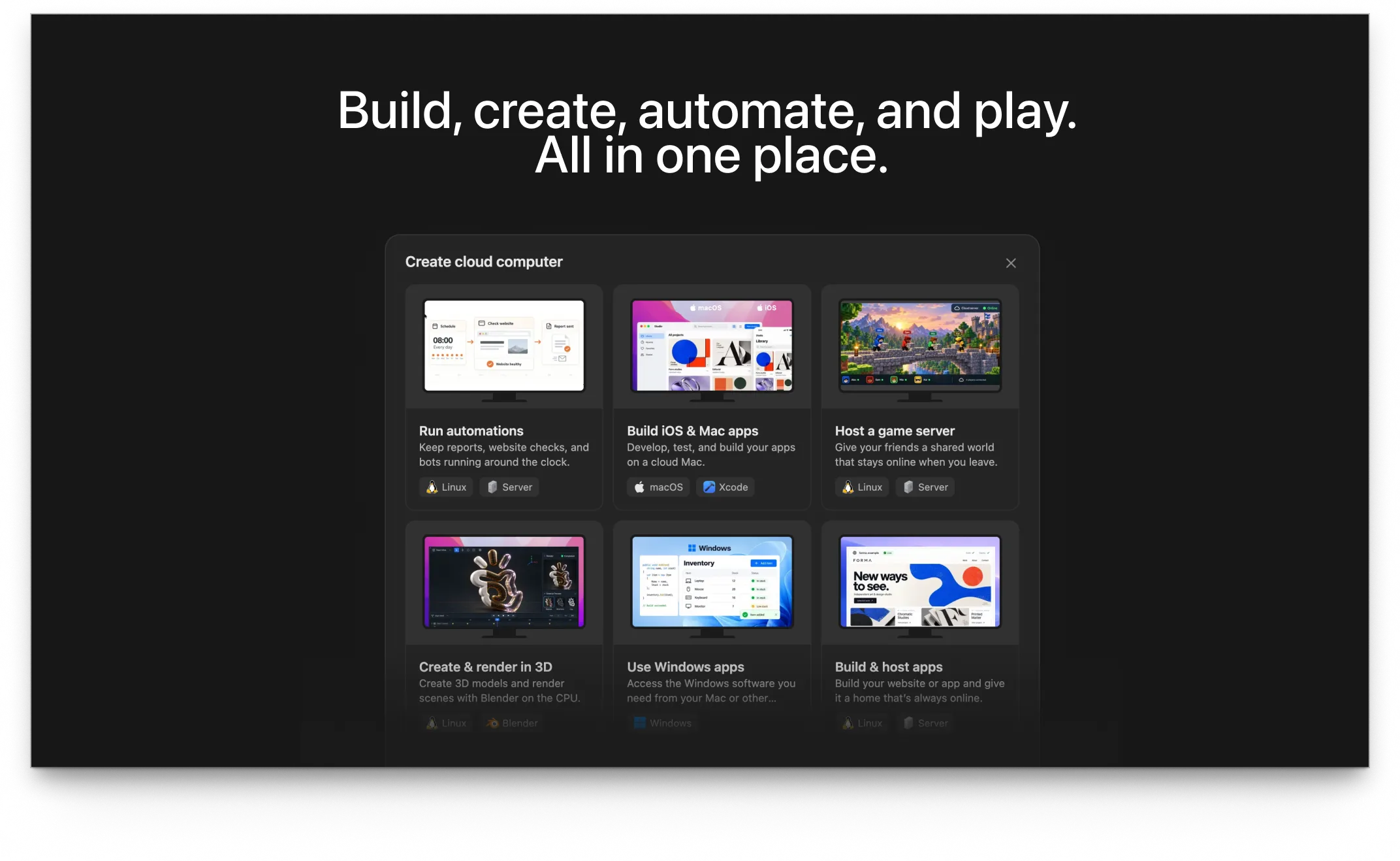
Image source: official Manus 2.0 release materials.
Temporary Sandboxes and Persistent Cloud Computers
A temporary Sandbox suits work with a clear endpoint. Analyze a dataset, run a script, or generate a document, then deliver the result. The execution environment can be reclaimed afterward.
An ongoing project needs to retain more. When you return to the code, its dependencies should already be installed, the data should still be in the same directory, and the database you configured should be ready to use. Cloud Computer preserves those files and software configurations. Service processes can run across sessions, so a bot or server stays online after the user ends a conversation.
Keeping files and keeping programs running solve different problems. File persistence saves repeated uploads, installation, and configuration. Continuous execution supports bots and game servers that need to keep responding to requests. These projects need an environment that remains available and maintained after the code is delivered.
Manus still provides its regular Sandbox. According to its product description, each task starts in a temporary Sandbox, and Manus decides whether to use Cloud Computer based on the task's needs. Persistent cloud computers support ongoing work and resident services; every one-off task does not need to occupy a machine indefinitely. Cloud Computer product description
Reports Use a Database That Accumulates Data Week After Week
The Cloud Computer product page gives weekly sales analysis as an example. A user creates a MySQL database and uploads a new CSV each week. A program updates the database and generates a trend report. Later reports can use the accumulated data, without rebuilding the database for every task.
The exported spreadsheet is only part of what needs to remain. Historical database records, the processing program, and its configuration must be available for the following week's work. Last week's report in a chat history cannot replace a working database.
Installed software has similar needs. Manus lists open-source tools such as Metabase and Home Assistant, along with command-line development tools. Once installed and configured, they remain available for later use, with the agent modifying or processing new files in the same environment. Recreating a temporary Sandbox means preparing the software and configuration again. Cloud Computer product description
Bots and Scrapers Keep Running After the Conversation Ends
The help page also describes an always-on Discord bot and a web scraper that runs every hour. The bot needs to receive messages, and the scraper needs to keep running on schedule. Both still have work to do after the user ends the current conversation. Cloud Computer help
Persistent storage and continuous execution each have concrete uses. Sales data accumulates across weeks, and installed tools remain available for later tasks. Bots need to stay reachable, while scrapers need to run at scheduled times. Temporary Sandboxes suit tasks that finish with a delivered result. Cloud Computer retains the files, software configuration, and execution environment for the work that follows.
Multiplayer games in Manus 2.0 have the same requirement. After the agent generates a game, its server still needs to respond to players. Users select multiplayer in Game Dev and purchase a Cloud Computer; Manus handles the subsequent configuration. Hosting is available within the product, and users can continue modifying the game while retaining the running service.
What Teams Retain When They Keep Working with an Agent
The continuity Cloud Computer emphasizes also matters for teams using agents every day. Code and assets often need more work the next day, and later tasks may depend on software already installed. Retaining the execution environment lets members continue their work. Teams also need to decide which files are shared and which belong to personal tasks.
CubePlex is an agent work platform for teams. Members can use a shared agent, knowledge, and tools within the same Workspace.
CubePlex was designed from the outset to give agents persistent work environments, using Sandboxes to store working files and execute tasks. A member's one-to-one conversations use their personal Workspace Sandbox by default, so a new conversation can access the working files already there. Group conversations and Topics can have their own Sandboxes, keeping collaborative files separate from personal work. The agent runs commands, installs tools, and reads or writes files in the corresponding environment.
File persistence and machine uptime need to be considered separately. A CubePlex Sandbox can be paused or shut down while its working files remain in persistent storage. When code needs to run again, the container starts or resumes with those files available. CubePlex guarantees continuity of working files here. Manus Cloud Computer additionally emphasizes programs running around the clock. Hosting a resident service requires separate attention to instance suspension, reclamation, and service availability.
Teams also need to reuse the agent's established ways of working. Role settings, business knowledge, and tool authorization need clear places to be managed, just as files need somewhere to be stored.
CubePlex organizes these configurations around the Workspace. Members use the same Agent Persona and enabled Skills, while Workspace Memory retains shared project facts and procedures. Tasks started through the Web or IM use these configurations without requiring a new agent setup for every conversation.
Shared tools also have authorization scopes. MCP connectors are enabled in the Workspace, and credentials can belong to an organization, a Workspace, or an individual member. The same connector can use a team service account or require each member to connect their own account. Teams can share the agent's tool configuration while managing personal identities separately.
A team can therefore maintain a Workspace Agent over time, using its configured knowledge and tools for new tasks. Personal work and collaborative tasks use their respective Sandboxes, with files retained within the corresponding scope. After closing a conversation, the team can continue using the agent and find the files from its earlier work.
Sources and Versions
- Cloud Computer help and product description explain the difference between temporary Sandboxes and persistent environments. The help page is dated June 5, 2026, before the 2.0 release.
- Official Manus 2.0 announcement (September 28, 2026)
- CubePlex source and documentation: Workspace setup, Sandbox management, and Sandbox scope model.
Open-source projects
Bring agents into your team's day-to-day work
CubePlex
A self-hosted AI agent workspace for teams to handle document, data, and cross-system work with centralized access control and execution records.
View CubePlex sourceCubeLoop
A high-performance, traceable, async-native Python agent framework with production-grade persistence.
Visit CubeLoop