CubePlex vs DeerFlow: Personal Agent Environments and Team Agent Workspaces

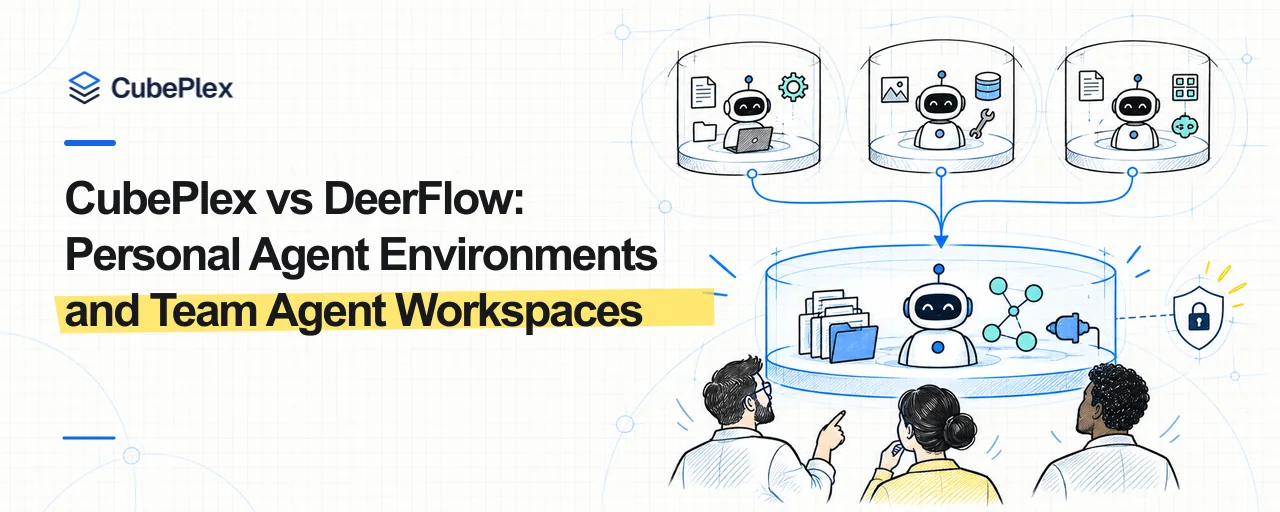
DeerFlow 2.0 and CubePlex are both general-purpose agent environments. Both support long-term memory, Skills, MCP, Sandboxes, Sub-agents, and messaging integrations. Both let users research, write, code, and work with files from one conversation instead of building a separate App for every use case. Their open-source repositories are available at bytedance/deer-flow and cubeplexai/cubeplex, with usage and deployment guidance in the DeerFlow Documentation and CubePlex Documentation.
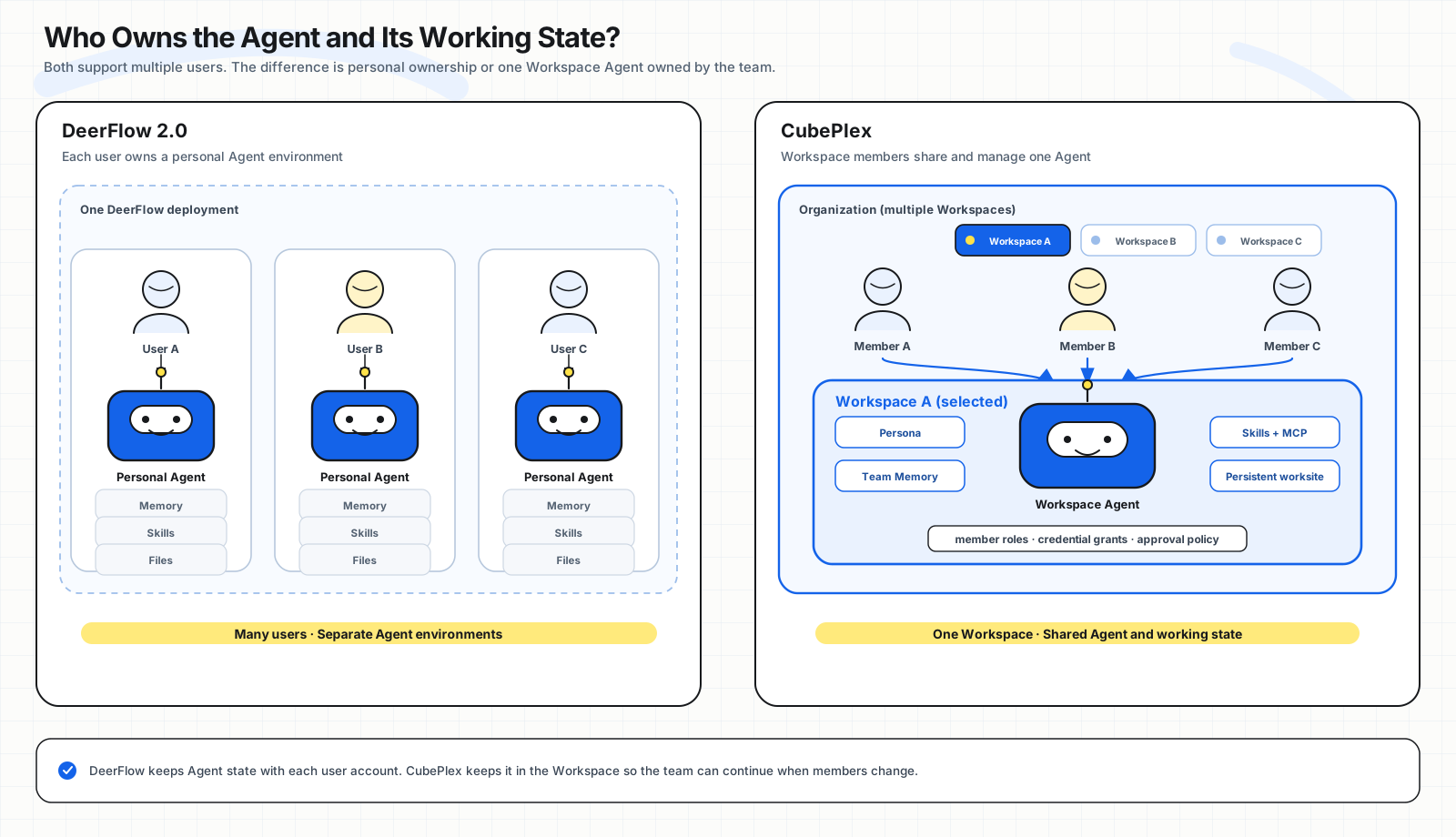
The difference starts with who owns the Agent. DeerFlow gives each user a personal Agent environment. After signing in, a user sees their own Agents, Projects, conversations, memories, Skills, and files. CubePlex places the Agent inside a Workspace. An organization creates the Workspace, adds members, configures the Agent, and decides which Skills, MCP servers, and credentials the team can use.
If OpenClaw represents a long-running desktop Agent for one person, a CubePlex Workspace is the team version of that product shape. The Agent has a stable name and way of working, knows the project context the team has confirmed, and uses team-approved Skills and MCP connections. It can work with organization accounts, project accounts, or each member's own account. Members can reach it from the web, Slack, Feishu, or other channels. Private chats, group conversations, and Topics can keep separate conversation and execution contexts, while the Agent's identity, team knowledge, and tool configuration remain with the Workspace. When a member leaves, the Agent and the team's accumulated working state remain with the team.
DeerFlow multi-user deployments still center on personal ownership
DeerFlow is not limited to a single-user local installation. It has administrator and regular user accounts, sign-in, user isolation, and optional RBAC. Production deployments can use PostgreSQL, Redis, containers, or Kubernetes Sandboxes. Multiple users can sign in to the same DeerFlow service, but each account opens its own Agent environment.
The Agents, Projects, conversations, long-term memories, Custom Skills, and files created by a user belong to that account. Another user sees a different set of resources and cannot directly take over the first user's Agent, memories, or working files. Messages from connected Slack, Feishu, and other messaging accounts also return to the Agent environment of the user who owns the binding.
DeerFlow also has Projects. A user can group related conversations into a Project and give them shared instructions, but the Project still belongs to its creator. It has no member list or shared roles. It is closer to a project folder in a personal workspace than to a CubePlex team Workspace.
DeerFlow can therefore serve many users, but those users operate their own Agents inside the same deployment. They do not jointly enter one Agent Workspace.
The CubePlex Agent belongs to a Workspace
CubePlex starts with an Organization and a Workspace, then adds users as Workspace members. The Workspace is the Agent's long-term environment. Its Persona defines the Agent's identity and working style. Team memory retains confirmed shared context. Skills and MCP determine what the Agent can do and which systems it can reach. Member roles determine who can change those settings.
The practical effect is continuity. When a member leaves, the Agent's Persona, team memory, Skills, and MCP connections do not need to be migrated from that person's account. A new member can join the Workspace without rebuilding the Agent. Members may have different roles, but they work with the same long-running team Agent.
The same Workspace Agent is available from the web, Slack, Feishu, and other entry points. A direct message can have a personal conversation and execution context. A group can share a Conversation, while a Topic can have its own context. The Workspace retains the Agent's team identity and capabilities; a Conversation or Topic retains the messages, files, and execution state for a particular piece of work. One Workspace does not force everyone into one chat or every task into one Sandbox.
Ownership and governance boundaries
| Resource | DeerFlow 2.0 | CubePlex | Effect on usage |
|---|---|---|---|
| Agent | A Custom Agent belongs to a user | The Agent Persona belongs to the Workspace | Each person maintains an Agent, or a team maintains one together |
| Project / Workspace | A Project belongs to a user and organizes that user's Threads | A Workspace has members and roles | Organize personal work, or maintain a durable team collaboration space |
| Conversation | A Thread has one user owner | A Conversation lives in a Workspace and can be divided by direct message, group, or Topic | Keep conversations personal by default, or share working context under member permissions |
| Memory | Primarily stored by user and Agent | Supports personal, workspace, and org scopes | Let a personal Agent learn about one user, or separate personal, team, and organization knowledge |
| Skills | Public and integration Skills are globally available; Custom Skills are stored per user | Global catalog, organization installation, Workspace enablement | Let users extend their own Agents, or let an organization select versions and distribute them to Workspaces |
| MCP | Deployment-level configuration managed by administrators; credentials can be injected per user or request | Organization installation, Workspace enablement, and scoped credential grants | Manage one instance-wide tool catalog, or control tools and accounts for each team |
| Sandbox | Usually reused by user and Thread; compute can be reclaimed while Thread files persist separately | Allocated inside Organization and Workspace boundaries, then scoped to a user, Conversation, or Topic | Provide a computer for a personal conversation, or an execution context aligned with team collaboration |
| High-risk operations | User isolation, optional authorization, and the Sandbox limit impact | Member roles, Workspace policy, and human confirmation work together | Control who can run tools and which commands must stop for approval |
These differences determine where the same administrative action takes effect. Adding a GitHub MCP server can mean adding it to an entire DeerFlow deployment. In CubePlex, an organization can install the Connector, enable it only for selected Workspaces, and require each member to connect their own GitHub account.
MCP server configuration and credential grants
DeerFlow stores its MCP server list in the deployment-level extensions_config.json. The Gateway exposes runtime configuration APIs, but adding, removing, or changing an MCP server requires administrator access. A shared remote MCP server can use user_auth to inject different credentials for different DeerFlow users, or read credentials from each request's Secret Context. Requests are denied by default when the required credentials are missing.
This design allows different users in one DeerFlow deployment to sign in to the same MCP service with separate identities. The server itself remains part of the deployment configuration. DeerFlow does not further model which organization installed a Connector, which Workspaces enabled it, or whether a Workspace should use a shared organization account or each member's personal account.
CubePlex separates those operations:
- An MCP Template is an installable connector definition and contains no runtime credentials.
- An Organization installs a Connector, making it an organization-owned resource.
- Each Workspace enables or disables that Connector and selects a credential policy.
- A Credential Grant can be shared at the organization or Workspace level, or assigned to a specific user within a Workspace.
This structure is useful when one deployment serves several teams. A finance Workspace can use an organization-managed account for its finance system. An engineering Workspace can enable GitHub MCP and let every engineer authorize their own identity. A Workspace that does not need a Connector cannot see it or access its credentials.
Skills: personal extension and team distribution
DeerFlow supports public Skills, integration-provided Skills, and user-uploaded Custom Skills. Custom Skills are stored under {base_dir}/users/{user_id}/skills/custom/, so different users can have Skills with the same name and different implementations. At runtime, DeerFlow projects the Skills enabled for the current user and Agent into the Sandbox. A Custom Agent can also restrict its available Skills and Tool Groups.
Each user can therefore install and change how their own Agent works without affecting other users in the same deployment. This fits a personal Agent that its owner improves over time.
The CubePlex Skill lifecycle is closer to internal software distribution. A Skill enters a global catalog and receives immutable versions. An organization selects a version to install, and each Workspace decides whether to enable it. The organization can distribute reviewed Skills to several Workspaces or install a private Skill for only one Workspace.
CubePlex Skills should not be described as having identical user, Workspace, and organization layers. Their current persistent management model consists of the global catalog, organization installations, and Workspace bindings. The user level records who uploads, installs, or invokes a Skill. Explicit user, Workspace, and organization scopes apply to MCP credentials and Memory rather than being mechanically repeated for every resource type.
Memory determines who the Agent learns for
DeerFlow Memory serves a personal Agent. Across different conversations, the Agent can continue to remember that user's preferences and facts. Different Agents created by the same user can also develop their own memories. Other accounts do not automatically inherit that information.
CubePlex requires a scope when Memory is saved:
personalstores preferences and corrections for the current user inside the current Workspace.workspaceshares project facts, team conventions, and work progress with Workspace members.orgmakes information available to the organization and is saved only when the user explicitly requests it.
The scope determines whether the Agent still knows what the team is doing when another person starts using it. A personal assistant must avoid exposing one person's preferences to someone else. A team Agent needs to preserve confirmed project knowledge for future members. A single undifferentiated long-term memory cannot satisfy both requirements.
Files attached to a conversation or retained by the working environment
Users rarely judge Sandbox persistence by a container ID. They care whether their files are still there after closing a chat, whether a new conversation the next day can continue the same work, whether another member can take over, and whether restarting the execution environment loses completed work.
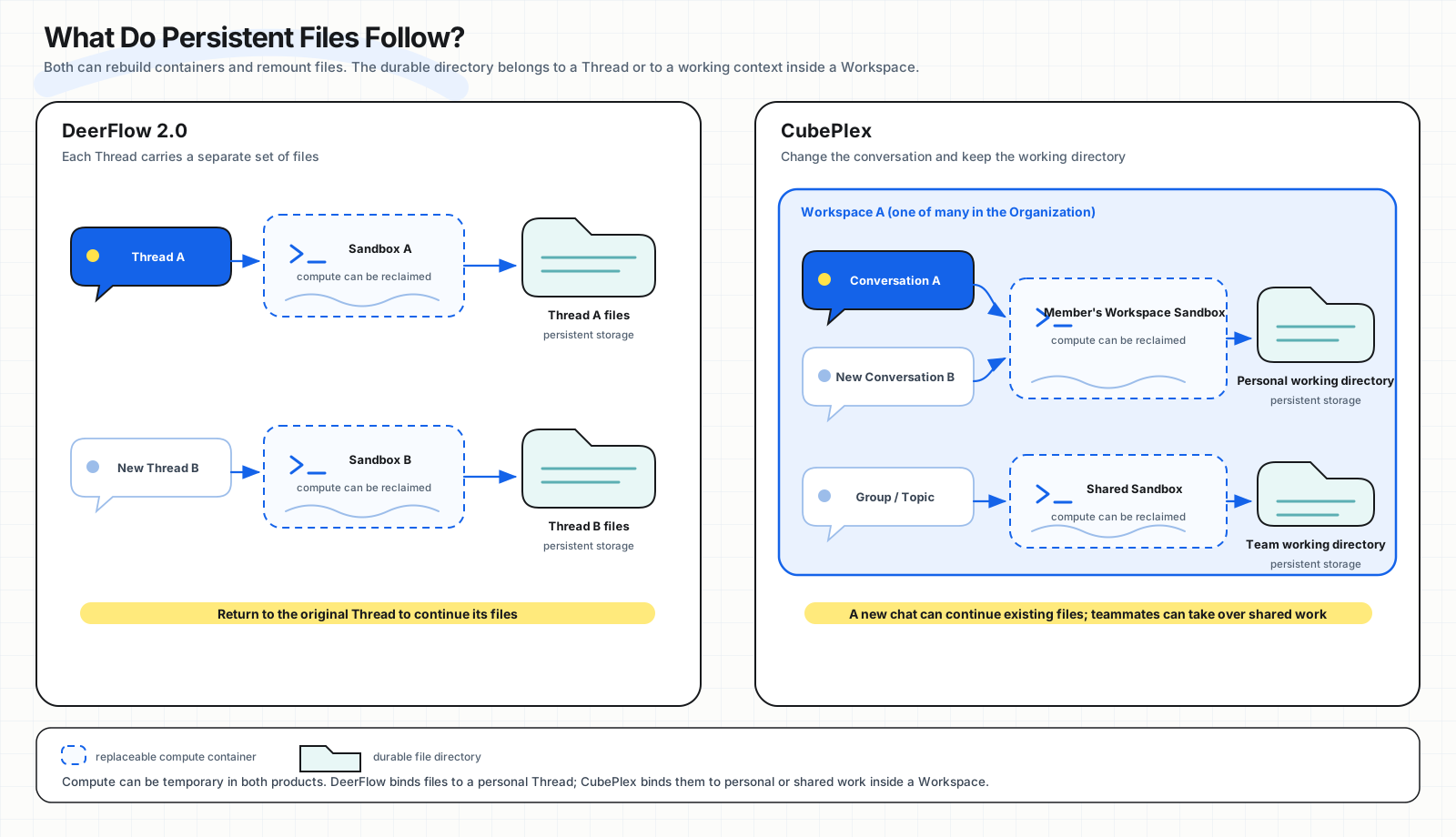
Both DeerFlow and CubePlex can keep files after a container or Pod is reclaimed. The difference is what those files follow. DeerFlow files follow a Thread. CubePlex files follow a personal or shared working context inside a Workspace.
DeerFlow: each Thread carries its own files
DeerFlow usually allocates a Sandbox to one user's Thread. When the user continues that conversation, the Agent reuses the Thread's uploads, workspace, and outputs directories. Sub-agents created by the Lead Agent work on the same files. With a host directory or PVC configured, a new Sandbox can mount those files even after the original Docker container or Kubernetes Pod has been destroyed.
A new Thread opens a different file space. A DeerFlow Project can group several Threads and give them shared Instructions, but the Project does not currently provide a shared project filesystem for those Threads. Returning to the original Thread is the direct way to keep working with its files.
DeerFlow persistence therefore keeps the work performed in a particular conversation. A Thread represents an ongoing task whose chat history and working directory remain together.
CubePlex: start a new conversation and keep the working directory
CubePlex manages Conversations separately from working directories. When the same member holds normal one-to-one conversations inside a Workspace, different Conversations can return to that member's personal Workspace Sandbox. The user can start a fresh conversation to avoid an increasingly long chat history while continuing to use existing project files, dependencies, and the worktree.
For multi-user collaboration, a group Conversation can have a Sandbox shared by its participants. A Topic can reuse its creator's environment or use a dedicated Sandbox. A team can share one project context or isolate sensitive and conflict-prone work while keeping the same Workspace Agent Persona, team memory, Skills, and MCP connections.
CubePlex persistence retains the working environment for a member or team. A Conversation carries the context of one exchange, a Sandbox carries long-lived files and the execution environment, and the Workspace places both under the same Agent and member permissions.
| User action | DeerFlow 2.0 | CubePlex |
|---|---|---|
| Continue the original conversation | Return to the original Thread and its files | Return to the original Conversation and its corresponding working context |
| Start a new conversation in the same project | A new Thread uses a new file space by default | One-to-one Conversations for the same member can keep using that member's Workspace Sandbox |
| Hand work to another member | The Thread and files belong to the original user; another account cannot directly enter them | Members of a group or Topic can continue using its shared Sandbox |
| Restart or reclaim the container | With a host directory or PVC, the Thread files can be mounted again | Files, project dependencies, and the worktree remain through restart, pause, resume, or container rebuild |
| Clean up intentionally | Deleting a Thread also deletes its Thread directory | Restarting preserves files; deleting the Sandbox makes the next execution start with empty storage |
Compute resources can still be temporary. A DeerFlow container can return to a warm pool and later be destroyed because of idleness or capacity. A CubePlex OpenSandbox instance can also be paused, stopped, or rebuilt. The product difference is the durable attachment: files belong to one personal Thread in DeerFlow, while CubePlex keeps a long-term working context that can cross Conversations and be shared according to Workspace membership.
Security reflects who is responsible for managing access
DeerFlow provides user identity, resource-owner checks, optional RBAC, Sandbox providers, run events, and audit capabilities. It protects the Agent resources of individual users within the same deployment.
DeerFlow also addresses secret exposure inside the Sandbox. By default, it removes Gateway environment variables whose names resemble keys, secrets, tokens, or passwords so Sandbox processes do not inherit platform credentials. A Skill declares required-secrets in SKILL.md, and the caller supplies them through request context. The secrets are not written into conversations, checkpoints, or run records. When a command executes, the real secret enters a newly created command process as a one-time environment variable, then DeerFlow redacts it from standard output returned to the Agent. DeerFlow's Lark integration also offers an optional broker sidecar that keeps that integration's original credentials outside the main Sandbox.
CubePlex uses a stricter general boundary for Sandbox secrets. After an organization, Workspace, or user saves a secret, the Sandbox environment receives only a non-authorizing cbxref_… placeholder. Code sends a request with the placeholder. The egress proxy verifies that the destination host and header match the secret policy, then replaces the placeholder with the real value outside the Sandbox. Code, processes, files, and logs inside the Sandbox never receive the real secret. A leaked placeholder cannot be used outside its assigned Sandbox and destination.
Both products can restrict Sandbox outbound access, with different defaults and coverage:
| Network control | DeerFlow 2.0 | CubePlex |
|---|---|---|
| Default policy | Docker AIO defaults to open, preserving normal Docker outbound access | Administrators can select default Allow or Deny and add host, wildcard-domain, or CIDR rules |
| Restricted mode | isolated blocks outbound traffic; allowlist permits only specified HTTP / HTTPS domains | Network policy is applied when the Sandbox is created and enforced as Allow / Deny by the OpenSandbox egress layer |
| Temporary access | When an allowlist blocks a public domain, the user can allow it once or for the lifetime of the current Sandbox | Commands can use allow, deny, or confirm; network destinations are controlled by administrator policy |
| Current limitations | Restricted network modes currently support only the local Docker backend and require Docker Engine 28 or later; unsupported modes such as the Provisioner refuse to start | Network policy and secret substitution share the OpenSandbox egress path, so deployments must enable the corresponding Egress component |
DeerFlow covers the common network modes of open access, no network, and a domain allowlist. CubePlex integrates network policy with layered secret management, egress substitution, and Workspace permissions under the same governance model.
DeerFlow deployment administrators still carry substantial responsibility. Administrators maintain MCP configuration. Even with restrictions on commands and dangerous arguments, an stdio MCP server registered through the API remains defense in depth because an administrator can make the Gateway load software they control. DeerFlow also documents Skill allowed-tools as a behavioral constraint for the model rather than a hard security boundary. The default LocalSandbox runs directly in the host environment, so deployments must select a container or remote isolation provider when required by their threat model.
CubePlex turns part of this day-to-day deployment responsibility into product permissions inside an Organization and Workspace. The Organization determines which capabilities can be installed. The Workspace decides whether they are enabled. Member roles determine who can change configuration. MCP credentials are stored separately from Connector definitions. Sandbox command policy supports allow, deny, and confirm; a command that matches confirm pauses until a person approves or rejects it.
The primary security boundaries are therefore different:
- DeerFlow centers on the user, Thread, and deployment administrator.
- CubePlex centers on the Organization, Workspace, member, and the execution scope of the current Conversation or Topic.
In a personal environment, an administrator can decide which capabilities are available to the entire instance. In a team environment, the same Connector, Skill, or command may need different results for different Workspaces, members, and credential sources.
Agent runtime and long-running execution
DeerFlow's Agent Runtime is built on LangGraph and LangChain and runs inside the Gateway. The Lead Agent receives the task, while Middleware handles context compression, planning, Sandbox access, Memory, and Sub-agents. The Gateway provides LangGraph-compatible Threads, Runs, and streaming APIs.
CubePlex uses CubeLoop, an independent open-source framework, as its Agent Runtime. CubeLoop provides asynchronous multi-model access, tool calling, streaming events, Middleware, Checkpoints, human confirmation, and Sub-agents. For each run, the CubePlex control plane assembles the current Workspace Persona, Skills, MCP connections, layered Memory, Sandbox policy, and member identity into the Agent loop. Model inference and task scheduling stay in the control plane. The Sandbox handles isolated execution such as files, Shell, and browser work.
Both runtimes can plan long-running tasks, call Skills and MCP servers, and delegate research, coding, or content creation to Sub-agents in parallel. A DeerFlow Sub-agent has its own context and tool configuration while sharing the current Thread's Sandbox files with its parent Agent. Context compression, task lists, Artifacts, background MCP tasks, run events, and multiple Sandbox providers support an individual's end-to-end task.
CubePlex places long-running execution inside Workspace governance. Sub-agents use team-approved capabilities. Costs are attributed to the Organization, Workspace, user, and Conversation. High-risk commands can pause for confirmation. Results remain in the corresponding team working context. The same control plane determines which team initiated the task, which organization capabilities it can use, where the cost belongs, which information should be shared, and how the next member can continue the work.
Where each product fits
DeerFlow 2.0 fits individuals and multi-user environments where users work independently. Each user owns their Agents, Projects, Skills, Memory, and Sandbox, with strong support for long-running tasks, Sub-agent orchestration, and rich content creation. A team can deploy and operate DeerFlow centrally, while each member's working assets remain primarily personal.
CubePlex fits teams that treat an Agent as a long-running work environment. Members share one Workspace Agent. The organization distributes Skills and MCP connections. Different Workspaces receive different capabilities and credential policies. Personal and team memories remain separate, and high-risk operations can enter an approval flow.
A Workspace does not require several members. Its creator can use it alone as a long-lived personal Agent environment, covering DeerFlow's common personal usage model. The difference appears when collaboration begins: the Workspace owner can invite other members to use the same Agent, team memory, Skills, MCP connections, and working context without first migrating a personal Agent into a separate team system.
CubePlex can begin as one person's Agent and extend the same Workspace to an entire team. The Agent keeps the same ownership model as it grows from a personal tool into team infrastructure.
Open-source projects
Bring agents into your team's day-to-day work
CubePlex
A self-hosted AI agent workspace for teams to handle document, data, and cross-system work with centralized access control and execution records.
View CubePlex sourceCubeLoop
A high-performance, traceable, async-native Python agent framework with production-grade persistence.
Visit CubeLoop